
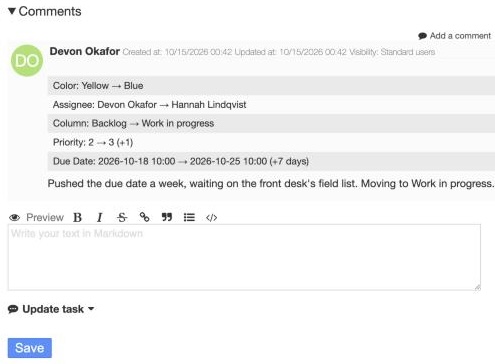
CommentTater is a Kanboard plugin that lets you update a task’s fields while posting a comment. Changes made to the task from the comment are shown on the posted comment and are included in Kanboard email notifications, too.
Without CommentTater, you edit the task in one form and post a comment about it in another. With CommentTater, write up your comment, click the Update task dropdown, change a field, and save. CommentTater saves the comment and updates the task at the same time like other project management systems.
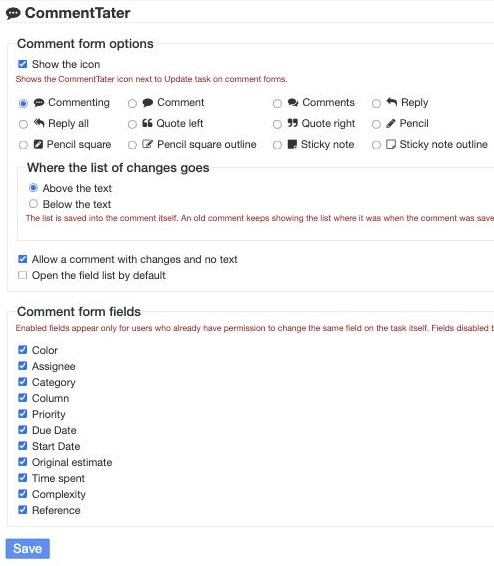
Settings let you set the CommentTater icon, choose where the task’s changes appear in the comment (either above or below the comment text), allow comments to be posted with changes but without any text, and choose whether or not the Update task dropdown is open by default.
Updating tasks while posting comments
The comment form has an Update task dropdown under the comment text field. Admins can choose whether or not it’s open by default.
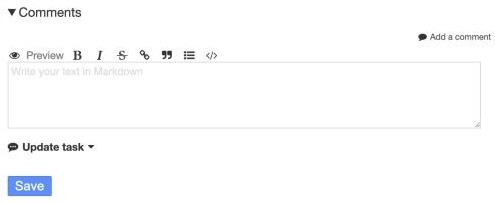
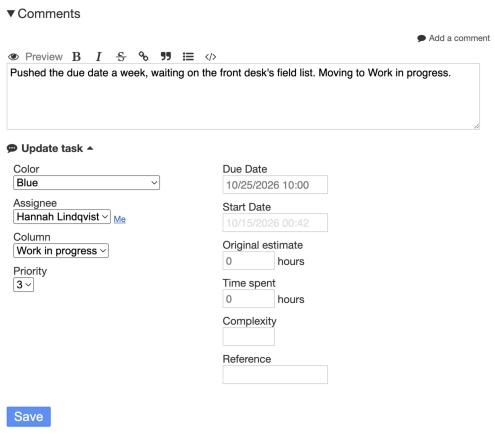
Task fields are displayed when the Update task dropdown is expanded. Write up your comment, click Update task, change a field, and save.
The comment shows what changed.
At Settings -> CommentTater, admins can choose the icon, the enabled fields, if comments can be posted with changes and no text, and whether or not the Update task dropdown is open by default, and where the list of task changes is displayed.
GNU General Public License v2. See LICENSE for details.