
NotifyMe is a Kanboard plugin that sends email and Notifications menu notifications for your own actions (by default, Kanboard only notifies you about actions that others make). It also adds a vacation mode, notifies users of failed login attempts, and gives admins control of how many notifications are shown in the Notifications menu.
If a task is created and no one hears it, does it make a sound?
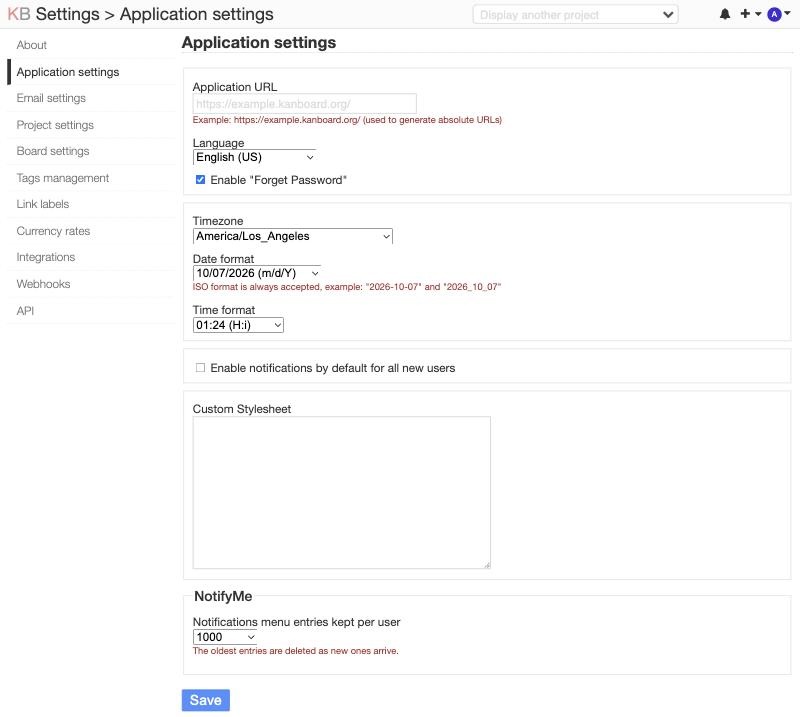
Settings -> Application settings -> NotifyMe sets how many Notifications menu entries are kept per user.
What NotifyMe sends notifications for
Email and Notifications menu entries:
- Task created, updated, closed, opened, or moved to a different column or swimlane
- Task assignee changed (including self-assignment)
- Subtask created, updated, or deleted
- Comment added, updated, or deleted
- File attached to or deleted from a task
- Task link created, updated, or deleted
Email only:
- File attached to or deleted from a project
- Failed login attempt using your username if your account is active (at most one email per hour to prevent email bombing)
- Wiki page created, updated, or deleted
Failed logins
When someone fails to log in with an active account’s username, that account’s owner gets an email about it with their username and a prompt to change the password if it wasn’t them. At most one goes out per account per hour to prevent email bombing. Kanboard’s own lockout still limits the login attempts.
Notifications menu limit
NotifyMe adds a “Notifications menu entries kept per user” setting to Settings -> Application settings -> NotifyMe with options for 100, 500, 1000, and Unlimited.
Kanboard doesn’t trim a user’s Notifications menu, and a busy account can collect thousands of unread entries until the notifications menu page runs out of memory and refuses to open. Select Unlimited to turn trimming off, or select 100, 500, or 1000 and click “Save” to trim older entries.
The default is the 1,000 most recent entries, so installing NotifyMe fixes a Notifications menu page that won’t open.
Vacation mode
Vacation mode pauses many (but not all) Kanboard emails to a user, which is especially helpful for users who have an out-of-office autoresponder when Mailmagik is installed. Paused email types are tasks, subtasks, comments, file and link events, mentions, and overdue digests.
Failed login attempts, password resets, invitations, and NotifyMe’s own Vacation mode on / off emails do get sent.
Vacation mode is controlled three ways:
- A user turns it on for each project they belong to from their profile (in “Vacation mode” on their profile’s sidebar) and a “Vacation mode is on” message is displayed.
- A project manager turns it on for a member in their project (in “Vacation mode” on the project’s sidebar) and a “Vacation mode is on” message is displayed.
- Any login or browser visit with an already logged in browser turns Vacation mode off, shows a “Vacation mode turned off” message, and sends an email to the user and to each project manager who set vacation mode for them in a project. A project flag set before NotifyMe kept who set it emails the user only.
Email notifications are paused, but notifications in the Notifications menu still accumulate so the user sees what happened when they get back. Flags are stored in user metadata (notifyme_vacation, notifyme_vacation_project_<id>, and notifyme_vacation_setter_<id>, which holds the ID of the project manager who set that project’s flag).
Vacation mode covers email notifications from Kanboard and other plugins (core, Mailmagik, or TagAlong) since NotifyMe replaces Kanboard’s userNotificationModel and skips only the email type.
If Mailmagik is installed, out-of-office messages can create an endless loop: a user receives an email notification, an out-of-office message is sent back, Kanboard / Mailmagik gets an email notification about being out of the office, Kanboard sends an email notification about that, and so on. NotifyMe vacation mode fixes that.
Kanboard labels its emails Auto-Submitted: auto-generated, so compliant autoresponders should skip them.
Wiki plugin
If the Wiki plugin is installed, NotifyMe also emails you when you create, update, or delete a wiki page.